


Hey everyone! We’re super excited to share something fresh and fun with you. If you’ve been using our good old WODscreen to splash workouts, leaderboards, and member activity onto your gym’s TV, you know it’s been reliable but maybe a little on the old-school side. Well, say hello to Workout TV, our new and improved way to keep your gym info looking sharp and more customizable.
More Customization, More Control
Think of Workout TV as WODscreen’s cooler, more flexible sibling. You can still show off all those familiar screens (WODs, activity feeds, leaderboards), but now you get to tweak them a bit more. Want bigger fonts? Smaller fonts? Want to hide certain details like average scores or movement GIFs? It’s all up to you. You can even toggle athlete instructions on or off to match the vibe of your gym.


A Sleeker, More Modern Design
We’ve freshened up the whole look. Workout TV has a cleaner, more modern interface that’s going to look great in any gym. The idea is to keep everything clear and easy to see, while letting you decide how it all gets displayed.
Timeline and How to Get Started
So, how do you jump into Workout TV right now? It’s pretty straightforward: you can head over to btwb.tv on any internet browser and sign in there. Once you’re logged in, you’ll have a side menu that lets you control all the settings and customization options for the screen right from your computer.
But if you’d rather use your phone as a remote, you can do that too! Just go to btwb.tv on your browser and look for the TV icon in the top right corner of your app’s home screen. If you scan the QR code from the slide-up screen there, it’ll turn your phone into a remote control inside the btwb app. That way, you can manage everything right from your phone while your workout is up on the big screen.


Oh, and just a heads-up, the Chromecast feature isn’t live on day one, but we’re planning to roll that out next week. Once that’s in place, Workout TV will officially take over and WODscreen will ride off into the sunset.
On that note: that TV icon on the home screen is currently only available for our all-in-one gym subscription owners. But don’t worry, when we roll out the Chromecast update later next week, that icon will be available to everyone.
The Cool New “Class” Screen


Now here’s something we’re really pumped about: if your gym uses our all-in-one subscription, you’ll get access to a brand-new Class screen that wasn’t available in WODscreen. This is where things get really fun.
Basically, the Class screen guides everyone through the different parts of a class. When members arrive and check in (either through the btwb app or with a coach’s help), their names light up on the screen. You’ll see who’s reserved a spot, who’s checked in, and who hasn’t yet. Plus, you get fun little icons next to names, like who’s made the committed club this month or if it’s someone’s birthday.
Once the class starts, coaches can flip the screen into a new mode. It moves from check-in mode to showing off everyone’s workout scores as they log them. If someone hits a new PR or earns an achievement, it pops right up on the display so everyone can see and celebrate together. Coaches can even highlight up to four workouts that the class is doing, and the screen will cycle through them, showing who’s doing what.
A Note for Our Individual Users
And here’s a little extra cherry on top: with the upcoming Chromecast release, we’re also making Workout TV available to individual users. That means if you’re someone who works out at home, maybe in your garage gym with a TV on the wall, you can use Workout TV, too.
In other words, our old WODscreen was only for gyms. But now, if you’re a solo btwb user who just wants to cast your workouts up on a screen at home, you’ll be able to do that with Workout TV. It’s perfect for anyone who wants that extra bit of motivation or just likes having their workout info right up on a big screen in front of them.
*Note: individual users will only have access to the “Workouts” screen.
Why You’ll Love It
In short, we think you’ll love Workout TV because it gives you more flexibility and a fresh, modern way to keep everyone in the loop. Plus, that new Class screen and individual user support are going to make your sessions even more interactive and fun.
The Premier All-In-One Platform
Whether it’s planning workouts, managing membership options, class schedules or your billing, we have it covered. We are saving gym owners money every month by combining their workout tracking and gym management into one simple to use platform. Sign up for a custom walkthrough.

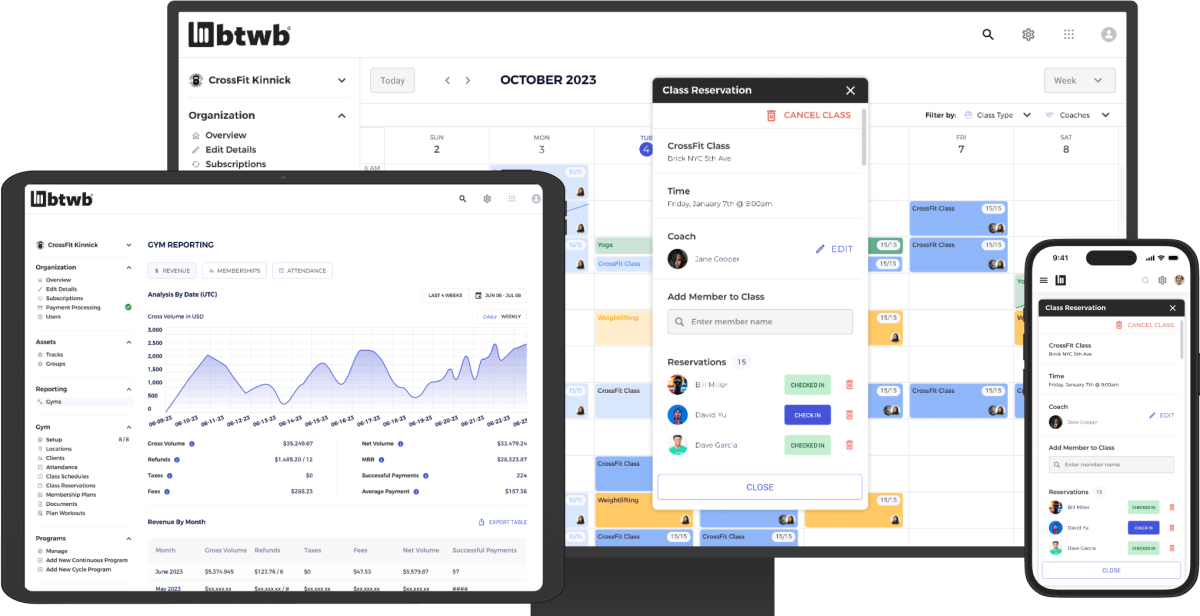
Why did we build the BTWB All-In-One gym management platform after sticking to workout tracking for ten years? The answer is simple: unlike other management platforms, we put fitness first.
Of course, we handle all the “back of house” essentials like billing, check-ins, and memberships because you can’t run a gym without them. But we see those as a necessary evil, not the reason people stay.
Healthy, growing gyms don’t struggle with retention. When members see results, they stick around. That’s why our platform is built around coaching, programming, and the class experience, because results solve the real problems.
It’s like a restaurant. Flashy signs and menus might get people in the door, but the food brings them back. In your gym, the “food” is member results. That’s what keeps people coming month after month.
We built BTWB to help you deliver those results, with tools designed for coaches and athletes, not just check-ins and billing. Sign up for a custom walkthrough.
Thanks for being part of this journey!